What's new

Cannot pin Settings

HiramSS

New Member
Joined
May 16, 2013
Messages
12
Points
1
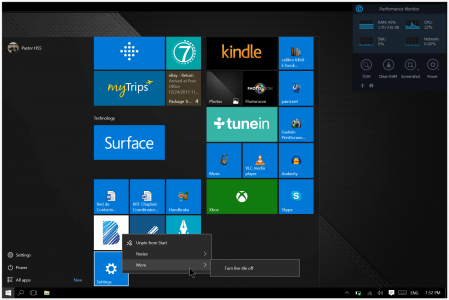
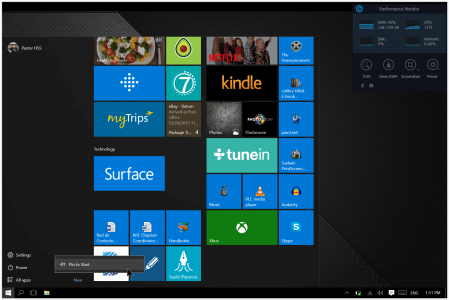
I’m trying to pin Settings to Taskbar. When I right click the icon in Start, all I get is “Pin to Start”. (no Pin to Taskbar) When I open it and it is on the Taskbar, I right click and only get “Close window”. I have tried a few other tricks, but nothing.


Any suggestions?


Thanks
 
When you right click settings in the start menu you should have 2 options, the second is more and you should find pin there. Do you not see any options?
 
Thanks Mark. That is just it. When I right click, contrary to apps, etc., there is no option to pin to Taskbark or more.

have you tried pin to start then do right button on the one on the start menu
 

Attachments

  • Screen Shot 12-24-15 at 01.52 PM 001.PNG
    Screen Shot 12-24-15 at 01.52 PM 001.PNG
    436.6 KB · Views: 522
  • Screen Shot 12-24-15 at 01.52 PM.PNG
    Screen Shot 12-24-15 at 01.52 PM.PNG
    513.1 KB · Views: 533
You can Pin the "Settings" to the taskbar without issue but not the individuals sub-settings
 
I can on my SP4 but according to the screen shot it appears not to be available to the OP.
 
Thanks for the help guys, but as the screenshots show, not right click on Settings, nor on Settings pinned to Start. If I drag to Taskbar from desktop, neither. :mad:

Christmas blessings to all.
 
Back
Top