What's new

Surface Pro Backlight Bleed Being Reported by Users

Maura

Member
Joined
May 2, 2017
Messages
65
Points
8
My Device
SPro4
Surface Pro backlight bleed reported.JPG

Tech Radar reports that some Surface Pro users have been complaining of a blacklight bleed issue with their new device, following on from the recent sleep-mode bug that Microsoft has recently fixed.

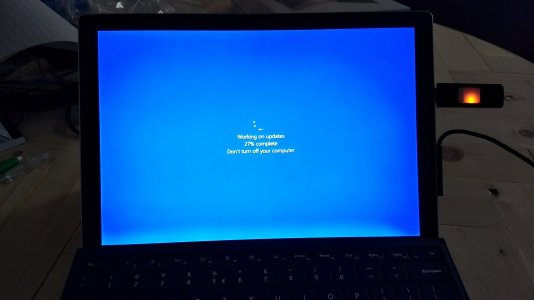
According to the complaints, there is apparently a higher degree of backlight bleed than would normally be expected from an LCD screen. These types of displays are usually expected to have a small amount of light leakage at the edge of the screen, but it seems that some new Surface Pro owners are noticing a light bleed that is so severe as to be distracting.

Tech Radar posted a comparison image that shows a Surface Pro 4 on top of a new Surface Pro. Certainly, in these images, there does seem to be a strong light bleed at the bottom of the newer device. Apparently, the light bleed is more noticeable against a solid blue or white background, or when the Surface Pro is in portrait mode.

Some owners are now starting to wonder why Microsoft has not yet even acknowledged the issue, with one user on Microsoft’s official support site, Answers.com, asking, “Why isn’t Microsoft acknowledging the new Surface Pro 2017 display backlight bleed defect and ignoring its customers after the launch of the product? When will they solved the problem?”

Source: Surface Pro reportedly has another glaring flaw with screen’s backlight bleed | TechRadar
 
Got my second Surface Pro in today (first one was very slow). See the pic below: looks like my unit has this backlight bleeding problem. :(

IMG_20170824_201606820.jpg
 
That comparison image is telling, but the tricky part is that backlight bleed on an LCD can look far worse in a photo than in person, so severity is hard to judge from a single picture. Still, if it's distracting against solid backgrounds or in portrait mode, that's a legitimate complaint regardless of how common minor edge leakage is. The bigger issue is the silence from Microsoft — even an acknowledgment that they're looking into it would help owners decide whether to exchange their units. Has anyone here compared the same panel brightness setting side by side?
 
The point about photos exaggerating backlight bleed is fair, but it doesn't explain away the portrait-mode complaints, since that's a viewing condition rather than a camera artifact. What I'd want to see is the same unit photographed at matched brightness and then judged in person, because a side-by-side at identical settings would separate a bad panel from typical edge leakage. The silence is the part that seems most avoidable here, since owners deciding on an exchange need something concrete to go on. Without that, second units like yours just become a gamble.
 
The portrait-mode angle is what stands out to me too, since that's a normal way to use the device rather than a photo trick. Matching brightness on the same unit before judging seems like the only way to tell a genuinely bad panel from ordinary edge leakage. On the exchange question, the lack of any statement from Microsoft does leave owners guessing whether a second unit would actually be better. If someone does swap, it'd be worth reporting whether the replacement shows the same thing at identical settings, because that would say more than another photo.
 
Back
Top