What's new

Screen Dead zones

BMoreawesome

New Member
Joined
Oct 27, 2014
Messages
23
Points
1
Location
On the Surface
My Device
SPro3
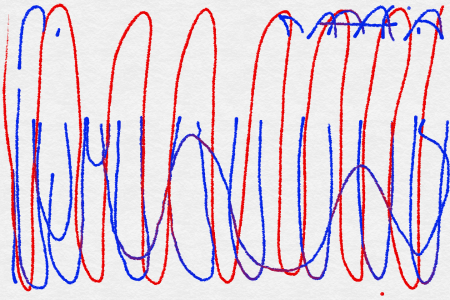
My surface is only two weeks old and have loved it. Noticed tonight thought that I have a dead zone in the touch. Mouse and pen work in this area but the finger touch does not work. I have reset the calibration and re- calibrated. If I have to refresh I am going to be upset as I should not have to do that on a two week old device. The searching I did was all a few months old so I am hoping there is a fix for this.
 
Typically a reboot fixes it, also I would reset your touch calibration as trying to set seems to break it....
 
Yep I have tried both. Still not working. I kind of think it is hardware related.

I just tested it in the bios mode and I am still getting the same issues. Guess I am calling Microsoft.
 
Last edited:

Attachments

  • Touch issues.png
    Touch issues.png
    442.2 KB · Views: 1,306
Well it is being sent in for a replacement. Really hope this doesn't happen again.
I hope you are exchanging it and not sending it to MS under warranty. Possibility of getting a refurbished model that way.
 
I had the same issue. Dead zone at top of screen for touch. Pen worked in red, touch in blue didn't. I ran into this article and it worked
Surface Pro 3 Touchscreen Problem • /r/Surface
Did you attempt to calibrate the Touch Panel from the legacy TabletPC Pen and Touch Control Panel? If so, reset it and see if the dead spot is gone, if it remains exchange it for a new one...
 
Back
Top