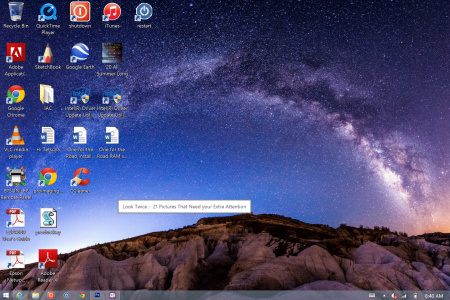
annoying desciption boxes

golfsferr

New Member
Joined
Nov 30, 2014
Messages
18
Points
1
Please help, I keep getting these annoying link description boxes. Sometimes there are 2 or 3 of them on my page that I'm trying to read. How do I get rid of them. I have googled this several times and tried many suggestion that I've found but nothing is working. Thanks for your help. Example is below.
 

Attachments

  • Screenshot (13).png
    Screenshot (13).png
    1.7 MB · Views: 732
I'm not certain what the other prompts are but that one looks a little suspicious. I would install Malwarebytes and do a scan to be certain you don't have something running that shouldn't be there.
 
Thanks for your feedback.
I have actually done a malware scan and found nothing of consequences. The prompt I showed you came up when I clicked on a link in AOL of some funny pictures that people have taken. They pop up on all kinds of innocent links. But I'll do another scan. Thanks.
 
Are you syncing anything to the cloud, like OneDrive?

What are some of the other prompts?
 
I'm not syncing to iCloud on purpose, I'll check that out. I'll post more prompts as I get them. Thanks
 
Does it still happen if you use a different browser? Have you gone through your Control Panel> Programs and Features, and looked for anything suspicious?
 
I looked in programs and didn't see anything I didn't put there on purpose.
It seems to happen in explorer and chrome. That's all I use. At the moment it's not happening as much as usual which seems to always happen when one "goes to the doctor". When it's bad I'll have 2 or 3 of them on the screen and can't see what I want to see. Thanks
 
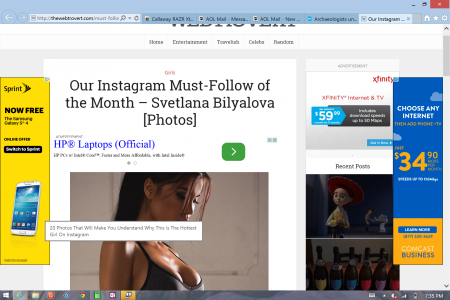
latest annoying prompt, guess I should check out hot girls
 

Attachments

  • Screenshot (14).png
    Screenshot (14).png
    575.6 KB · Views: 542
Back
Top