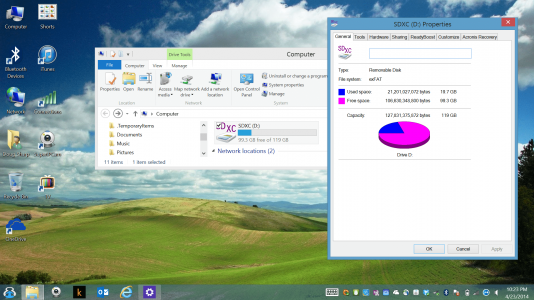
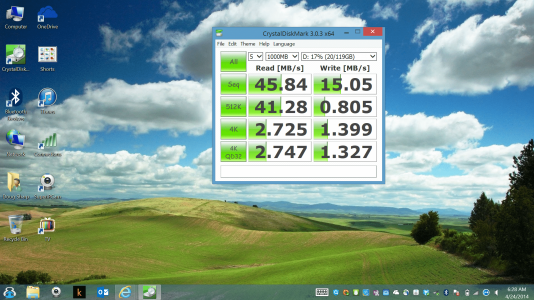
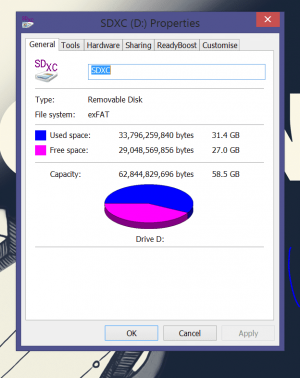
sharpuser Administrator Staff member Joined Aug 20, 2013 Messages 4,477 Points 113 Location Eastern USA My Device SurfaceBook2 Apr 23, 2014 #1 Replaced my 64 GB SDXC with a 128 GB SDXC. Performance just as good. I'm spaced out now. Last edited: Apr 23, 2014
wditters Active Member Joined Feb 1, 2014 Messages 151 Points 28 Location Amsterdam My Device SPro3 Apr 24, 2014 #2 What brand are you using and what speeds are you getting? (Crystal Diskmark)
OP OP sharpuser Administrator Staff member Joined Aug 20, 2013 Messages 4,477 Points 113 Location Eastern USA My Device SurfaceBook2 Apr 24, 2014 #3 Card is: Sandisk 128GB Ultra microSDXC(TM) Card with Adapter Model SDSDQUA-128G-G46A Speed up to 30 MB/s 200X Last edited: Apr 24, 2014
Card is: Sandisk 128GB Ultra microSDXC(TM) Card with Adapter Model SDSDQUA-128G-G46A Speed up to 30 MB/s 200X
daniielrp Active Member Joined Oct 26, 2013 Messages 687 Points 43 Location Preston, UK My Device SPro3 Apr 24, 2014 #4 How did you get it to analyse your SD card? That utility only seems to be showing me stats for the internal SSD?
How did you get it to analyse your SD card? That utility only seems to be showing me stats for the internal SSD?
jollywombat Member Joined Nov 25, 2013 Messages 171 Points 18 Location NY, USA My Device SPro2 Apr 24, 2014 #5 The drop down in the top right of the application will allow you to select the drive to be tested.
daniielrp Active Member Joined Oct 26, 2013 Messages 687 Points 43 Location Preston, UK My Device SPro3 Apr 24, 2014 #6 jollywombat said: The drop down in the top right of the application will allow you to select the drive to be tested. Click to expand... My fail, downloaded wrong one lol. Working now
jollywombat said: The drop down in the top right of the application will allow you to select the drive to be tested. Click to expand... My fail, downloaded wrong one lol. Working now
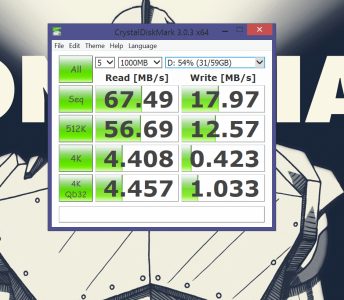
daniielrp Active Member Joined Oct 26, 2013 Messages 687 Points 43 Location Preston, UK My Device SPro3 Apr 24, 2014 #7 For comparison here is my Sony 64GB XDXC SF64UY
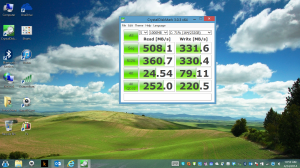
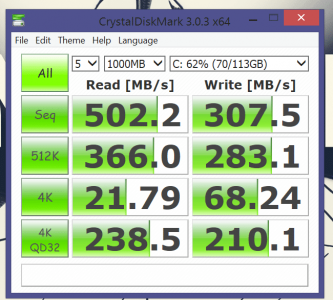
OP OP sharpuser Administrator Staff member Joined Aug 20, 2013 Messages 4,477 Points 113 Location Eastern USA My Device SurfaceBook2 Apr 24, 2014 #8 Formatted the same way? Here are my primary drive results: Last edited: Apr 24, 2014
daniielrp Active Member Joined Oct 26, 2013 Messages 687 Points 43 Location Preston, UK My Device SPro3 Apr 24, 2014 #9 Yeh as exFAT And here's the SSD, seems a bit slower overall than yours: Last edited: Apr 24, 2014
OP OP sharpuser Administrator Staff member Joined Aug 20, 2013 Messages 4,477 Points 113 Location Eastern USA My Device SurfaceBook2 Apr 24, 2014 #10 Though the larger 128GB SDXC card is a bit slower than the 64GB card from the same manufacturer, I think it is well worth having the extra space. Last edited: Apr 24, 2014
Though the larger 128GB SDXC card is a bit slower than the 64GB card from the same manufacturer, I think it is well worth having the extra space.
CrippsCorner Well-Known Member Joined May 31, 2013 Messages 2,191 Points 63 Location Essex, UK My Device SPro Apr 25, 2014 #11 Seems like a good enough reason as any to get high...
P PastorShaw New Member Joined Feb 9, 2014 Messages 19 Points 1 Location Las Vegas, NV May 2, 2014 #12 My Sandisk Extreme Plus 64gb is twice as fast as my 128gb MicroSDXC. While it's nice to have the space, one does get used to faster speeds than the current 128gb has.
My Sandisk Extreme Plus 64gb is twice as fast as my 128gb MicroSDXC. While it's nice to have the space, one does get used to faster speeds than the current 128gb has.