What's new

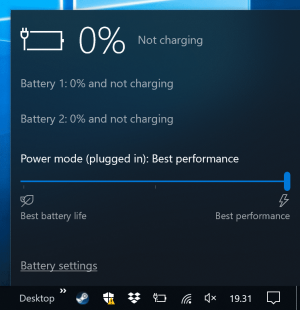
"0% and not charging"

TK-DKC

New Member
Joined
Oct 16, 2018
Messages
14
Points
3
My Device
Surface Book
Hi all,
After a period of weirdness described in another thread, Battery 2 finally got stuck on "0% and not charging".
I tried following the steps in Microsoft's troubleshooter to no avail.
Is there anything else I should try, or will I have to have it replaced (again)?
Thanks.
 
Last edited:
My SP2017 had this as well last few weeks. Up until a point where I wasn't able to take notes during a meeting. This is an issue that lives for years. How come, it cannot be fixed?
 
It got worse. While working on battery (power not connected), the laptop shut off, and now I'm seeing this.
 

Attachments

  • Screenshot (1).png
    Screenshot (1).png
    158.7 KB · Views: 1,618
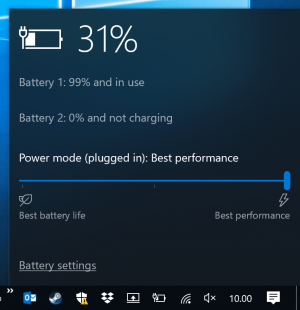
It gets weirder. I had left my laptop with the charger connected since Thursday, and now Battery 1 has charged. Now, however, the machine will occasionally drain that battery instead of taking power from the adapter despite reporting being plugged in...
I'll try with another adapter when I go to work tomorrow.
 

Attachments

  • Screenshot (2).png
    Screenshot (2).png
    160.3 KB · Views: 1,181
Crazy idea but has fixed a copy of other laptop issues over the years.
  1. Unplug the Charger
  2. Run your Surface Book until the battery drains and powers down
  3. Press and hold the power button for 15 seconds to any discharge out
  4. Plug Charger in and see if that fixed it
 
Just in case it's useful, my SurfaceBook 2 stopped charging which was always done via the Surface Dock. I have no idea why this might be, but flashing the firmware (on the Surface Dock) to the latest version resolved the issue and it started charging again.

HOWEVER, a side-effect is that any USB headset that is connected whist the laptop is docked with have intermittent microphone issues. Actual sound playback is fine.
 
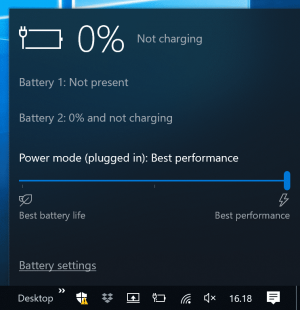
It gets even worse. See the attached.
I'm currently engaged in a legal fight with Microsoft through various consumer agencies in the EU to have them provide a new replacement since this battery issue arose so soon after I received the machine.
 

Attachments

  • Screenshot (3).png
    Screenshot (3).png
    144.5 KB · Views: 704
Back
Top