had the same problems yesterday and replied on another thread. Here is what I found:
"Okay, I experimented enough to answer my own problem. Here is what I found.
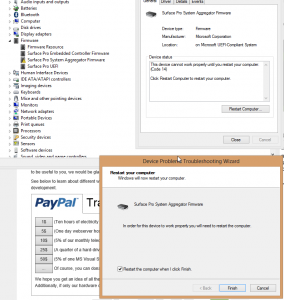
(1) TonyZ3's triangle question was the key to finding out how to have my Surface Pro recognize that it needed to update the firmware after failing the first time. I opened up the device manager, saw the firmware aggregator (aggravator???) triangle, right clicked on it, uninstalled it, told it to remove the device from my computer and restarted.
(2) I went to the Windows Update in control panel, asked it to see if any updates were available and "aha!" the firmware update was identified and downloaded along with a note that it would Restart and install. The first time I said yes, I failed again and the restart hung up without installing. So I went through (1) and (2) again, but this time I reasoned (why? I am not sure) that perhaps the firmware update expects a barebones or "as delivered" machine on which to install the software and I have pretty much every output hole in my surface full - USB (Hub with 5 devices), MiniDisplay (MDA) Port and SDXC slot (SDXC 64GB). So,
(3) I disconnected EVERYTHING that did not come with the machine and tried again (all gone except the Type Cover). The update downloaded, told me it would restart, it did, the "updating system software" showed under the word SURFACE on the startup screen, stayed on for about a minute, then re-re-started normally and when I checked the Device Manager and Update history all was right with the world. Firmware update successful and Device manager showed no triangles of any color.
(4) I did a shutdown, re-filled my USB, MDA and SDXC ports, restarted, came back to this forum and wrote this.
Hope this helps someone else."





 Replaced the display and upgraded the SSD in a Book 2 15"